Robot Mower Setup: 4 Types, Apps and Charging
· David
Robot mower setup starts with a charging base and a clearly defined mowing area. The work involved varies considerably: some systems use a wire around the lawn, while others use satellites, cameras or laser sensors to navigate a digital map.
Illustration by Yard Robot Lab. Boundary wire defines the perimeter; a guide wire provides a route. Wire-free systems store virtual boundaries. Layouts are conceptual and not to scale.
Another part of robot mower setup is choosing how you control it. A mower that needs no boundary wire may still need a smartphone app for setup. Some traditional wired models let you make the settings on the mower itself. Here is what the main approaches involve, without turning each one into an installation manual.
Paid affiliate links: Yard Robot Lab may earn a commission at no additional cost to you. As an Amazon Associate we earn from qualifying purchases. Amazon links are labelled searches; the Yarbo link leads to a complete mower system. Confirm the exact product, seller and availability before ordering.
Robot mower setup with boundary and guide wires
A boundary wire forms a loop around the mowing area and connects to the charging station. The installer also routes it around areas the mower must avoid, following the model’s instructions. Wire can be pegged to the ground or buried. Much of the initial work is planning the route and placing the wire correctly. 1,11
A guide wire has a different job. On Husqvarna models that use one, it runs from the charging station across the lawn to the boundary loop. It helps the mower find its way home and reach parts of the garden, including areas accessed through passages. It does not replace the perimeter wire. Other manufacturers may use different return methods. 2
Once installed, the owner sets the mowing schedule and checks that the mower covers the lawn and returns to charge. Changing the lawn layout can mean moving wire, and a damaged loop may need repair. The setup uses a physical boundary rather than a satellite-defined perimeter. 12
Robot mower setup without a smartphone app
Husqvarna’s Automower 310 Mark II is an example of a wired mower with a keypad and display. Its manual allows product settings through those onboard controls, including scheduling and installation settings. Bluetooth app control is also available, but the app is an alternative interface for those settings. 1
Search Amazon for Husqvarna Automower 310 Mark II
This distinction matters if you prefer physical controls. Ask whether the exact model supports initial setup and schedule changes on its display. A Start button alone does not establish that a mower can be configured without a phone. All robot mowers contain software; ordinary setup does not require writing computer code.
Wire free robot mower setup using satellites
Satellite-based systems replace the perimeter loop with virtual boundaries. RTK, short for real-time kinematic positioning, combines satellite signals with correction data to improve location accuracy. Depending on the model, those corrections come from a reference station installed at home or a compatible network service. 3,4
Setup generally involves positioning the charging station, establishing the correction connection, pairing the mower with an app and mapping the lawn. The owner defines the mowing areas, excluded areas and routes between zones. Good satellite reception remains an important site requirement, even on models that use additional sensors. 3,4
Segway Navimow
The antenna-based Navimow i Series provides a useful example. Its installation includes a charging station and GNSS antenna, then activation and mapping through the Navimow app. The mower combines satellite positioning with camera assistance. Finding an antenna location with a suitable view of the sky is part of the work. 3
There is no perimeter wire to lay, but this is still an app-based setup. The mower’s onboard buttons handle basic operations; they do not replace the app’s mapping process. Navimow now offers several product families, so check the exact model rather than assuming every Navimow needs the same antenna arrangement. 3
Search Amazon for Segway Navimow i105
Husqvarna with EPOS
Husqvarna also offers wire-free installation on EPOS-compatible Automower models. Virtual boundaries are created through Automower Connect. Depending on the model, year and local availability, the installation may need an EPOS accessory and a local reference station, or it may use Husqvarna Cloud corrections. 4
Cloud-based EPOS requires a stable internet connection across the work area. A local reference station provides corrections without an internet connection for navigation. Both arrangements still have model-specific site requirements. “Husqvarna” therefore does not automatically mean wired, app-free or wire-free. 4
Search Amazon for Husqvarna Automower EPOS
Mammotion LUBA
Mammotion’s LUBA 2 AWD is another example of an app-managed system with virtual mowing areas. Its support materials cover installing the charging and RTK stations, pairing the reference station and creating mowing areas and no-go zones. 5
Other Mammotion generations use different combinations of positioning technology, including LiDAR and network corrections. For a buyer, the useful question is which hardware and connection the particular model needs at their property. 6
Search Amazon for Mammotion LUBA 2 AWD
Search Amazon for Mammotion LUBA mini AWD LiDAR
Yarbo and its two positioning options
Yarbo is wire-free and app-managed, with two distinct positioning setups. With NetRTK, correction data arrives over the internet, avoiding installation of a local positioning station. Yarbo requires suitable regional coverage and a stable internet connection; buyers can check their address in the app. Its claim of setup in a few minutes concerns the positioning service, not a guaranteed time for assembling, mapping and checking an entire property. 16
The alternative is Yarbo’s physical Data Center, its local RTK base. Yarbo’s own comparison rates this installation as medium to high difficulty because mounting, drilling, cabling or ladder access may be involved. That arrangement can provide local positioning corrections without internet. The older installation guide calls for an unobstructed view of the sky. 16,17
Either route still involves the charging station, the appropriate mower module and app configuration of work areas, exclusions and schedules. Yarbo offers one-to-one video guidance and installer introductions. For someone uncomfortable with setup, confirm the available help before ordering; a higher purchase price does not establish an easier installation. 18,19
Check the complete Yarbo Y40 system with Lawn Mower Pro module
Robot mower setup using LiDAR or cameras
LiDAR uses laser measurements to understand the surroundings. Dreame’s A1 Pro uses this approach without a perimeter wire or an RTK reference station. The owner places the charging base, connects the mower to the app and creates a map. Dreame’s mapping instructions describe steering the mower around the lawn edge through the app to record the boundary. 7,8
Search Amazon for Dreame A1 Pro
Camera-based systems offer another approach. The eufy E15 and E18 use vision-based navigation and automatic mapping without a perimeter wire or an RTK station. Setup still involves placing and powering the charging base, connecting through the eufy app and reviewing the mowing areas. Automatic mapping reduces the mapping work, but the owner still needs to check the result and the model’s lawn requirements. 9,10
Check price on Amazon eufy E18
TerraMow: another camera-based setup
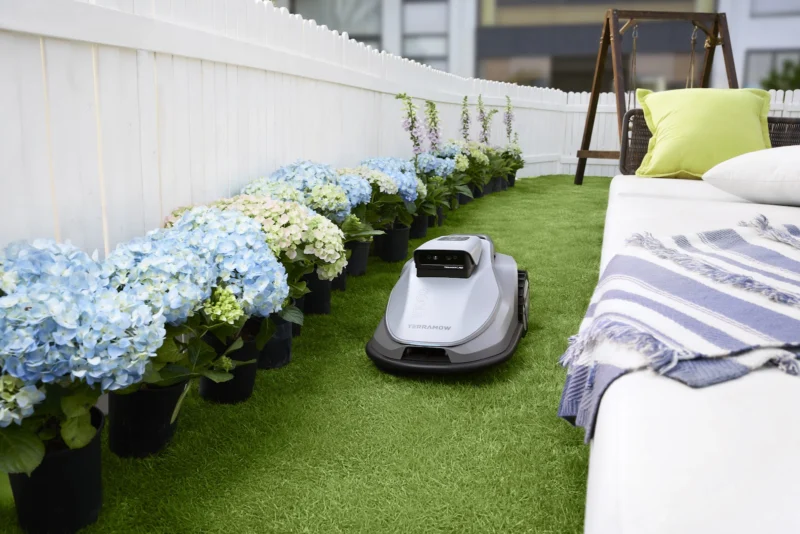
TerraMow describes its V600 and V1000 as camera-based mowers using TerraVision 2.0, automatic mapping and no boundary wire or RTK antenna. The app handles settings, schedules and mowing zones. That removes wire installation and a separate positioning antenna, but you still need a suitable powered charging location and must review the mowing area, obstacles and boundary conditions for your property. Automatic mapping does not establish that every lawn is suitable.
For these models, start with YRL’s mower comparison and check the exact model’s current manual. Check the TerraMow V600 or TerraMow V1000 at the manufacturer. Paid links: YRL may earn a commission.
These examples show why wire-free robot mower setup covers several different installations. A mower may need an antenna, an internet-based correction service, app-guided mapping or an automatic mapping run. Some combine technologies rather than fitting neatly into one category.
Robot mower setup comparison
| Approach | Main setup work | Role of the app |
|---|---|---|
| Boundary and guide wires | Place the base and install the required wire routes. | Optional for settings on some models with full onboard controls. |
| Satellite and RTK | Place the base, establish corrections and create virtual mowing areas. | Used for mapping on the examples discussed here. |
| LiDAR | Place the base and record a map of the lawn. | Used for mapping and settings on the Dreame A1 Pro. |
| Camera navigation | Place the base and let the mower map, then review the areas. | Used for setup and management on eufy E15 and E18. |
Robot mower setup picks for different owners and yards
These are editorial recommendations based on the documented setup requirements, not a hands-on ranking. A property assessment can change the choice.
Least technology for the owner
Our pick is a dealer-installed wired mower with full onboard controls. This puts the wire routing and first-run checks in the installer’s hands and lets the owner use a keypad and display. The Husqvarna 310 Mark II illustrates that control arrangement; confirm local availability or ask a dealer for a currently supported equivalent. It is easier for an owner who wants no app, rather than the least work for a DIY installer. 1
Search Amazon for Husqvarna Automower 310 Mark II
Least installation hardware for an app user
Our starting pick is an automatically mapping camera mower such as the eufy E15 or E18, for a lawn that meets its limits. There is no boundary loop or RTK station to install, and automatic mapping reduces manual surveying. You still need app setup, suitable connectivity and a review of the map. Check slope, grass type and lawn size before choosing the model. 9,13
Check price on Amazon eufy E18
Lots of trees and poor satellite reception
Our preferred wire-free setup type is LiDAR navigation that does not depend on satellite positioning, with the Dreame A1 Pro as an example to investigate. Dense canopy makes satellite reception worth checking carefully. A wired installation is another option when you prefer physical boundaries. This is a choice of navigation approach, not a guarantee that either mower handles every wooded yard. 4,7,14
Search Amazon for Dreame A1 Pro
Many obstacles and exposed roots
Choose a setup that lets you define exclusion areas and a mower whose passage widths and terrain limits fit the yard. Neither a wire nor LiDAR makes roots, fallen branches or small objects harmless. Dreame specifically identifies exposed roots as areas to exclude, and its support team notes that low objects can escape detection. For a difficult layout, a dealer survey or demonstration is more useful than naming a universal winner. 14,15
Robot mower setup questions
Which robot mower setup needs no smartphone app?
Look for a model whose manual supports initial settings and scheduling through onboard controls. The wired Husqvarna example above provides that option. Physical Start and Stop buttons alone do not establish that mapping and setup can be done without an app.
Does no Wi-Fi mean I need a boundary wire?
Not necessarily. Phone access, internet coverage and satellite reception are separate requirements. Some local RTK installations provide positioning corrections without internet, while network RTK needs an active connection. Check the exact mower and positioning service.
For a property with difficult reception, read our guide to robot mowers under trees. If you are considering a modular system, compare the complete equipment in our Yarbo modular system guide.
Manufacturer sources and verification notes
The picks evaluate installation and control requirements rather than field-tested mowing performance. Model names, equipment and availability vary by country and model year. Sources checked October 21, 2026.
1 Husqvarna Automower 305 and 310 Mark II and 315 Mark II operator manual
2 Husqvarna guide wire installation overview
3 Segway Navimow i Series user manual
4 Husqvarna EPOS installation options
5 Mammotion LUBA 2 AWD installation and mapping tutorials
6 Mammotion LUBA mini AWD LiDAR overview
7 Dreame A1 Pro navigation overview
8 Dreame A1 Pro mapping instructions
10 eufy app controls for E15 and E18
11 Husqvarna boundary and guide wire connections
12 Husqvarna finding and repairing wire breaks
13 eufy E15 suitability and setup requirements
14 Dreame A1 Pro mapping and excluded areas
15 Dreame support on low obstacles
16 Yarbo NetRTK requirements and comparison with its Data Center
17 Yarbo Data Center installation guide for the 2024 system