Robot Mower Safety Checklist: Yard Hazards and How Mowers Respond
A robot mower safety checklist starts with the yard, not the app. Mowers can avoid some obstacles, stop their blades when lifted or follow mapped boundaries, but behavior differs by model and conditions. A toy, hose, pond edge or person in the work area still needs your attention. Walk the property before the first run, observe a test mow, and repeat a shorter check before scheduled mowing.
This is general preparation guidance. Your mower’s current manual controls its installation, exclusion distances, weather limits, stopping procedure and maintenance. We have not safety-tested every model mentioned here.
Robot mower safety checklist: the five-minute walk
- Keep people and animals out of the mowing area. Pause or reschedule when children, pets or visitors will use the lawn. Check for wildlife before starting, especially near shrubs and at dusk.
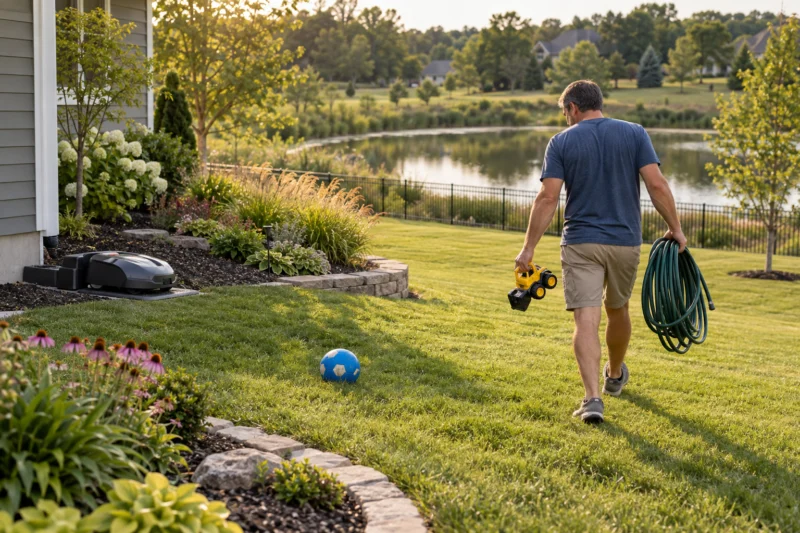
- Collect loose objects. Pick up stones, sticks, toys, pet bowls, cords, hoses, sprinkler heads left proud of the turf and garden tools. Inspect after wind or yard work.
- Look at the boundaries. Check the map or wire at beds, roads, driveways, steps, retaining walls, pools, ponds and drainage channels. Verify gates and transit routes.
- Walk the worst terrain. Examine wet patches, ruts, exposed roots and slopes at the edge as well as in the middle. Check the route back to the charger.
- Check the machine. Look for a damaged blade or guard, stuck debris, dirty camera or sensor, unusual noise and alerts. Stop and isolate power according to the manual before touching cutting parts.
Do not reach beneath a running or recently stopped mower. Use its prescribed stop and lockout procedure. A quick walk is especially important after storms, deliveries, parties, landscaping or a change in the mowing map.
How does a robot mower respond to hazards?
Boundary control is its first line of navigation. A wired model follows a buried perimeter signal; a wire-free model uses its map and positioning sensors. Neither boundary should be treated as a physical fence beside a road, water or a drop-off. Positioning can change with trees, buildings, poor signal or an incorrect map, so follow the maker’s specified buffer and barrier instructions.
Object avoidance may involve cameras, radar, ultrasonic sensors, LiDAR or bump detection. Some models steer around an object before contact; others touch a large object gently, stop and reverse. Detection is affected by object size, height, lighting, lens condition and the model’s software. Husqvarna explicitly says that radar or ultrasonic object avoidance is not a safety feature. Do not use a sensor claim as a reason to leave a toy, sleeping animal or child in the work area.
Lift and tilt sensors on many mowers stop the cutting blades if the machine is raised or tips. Husqvarna describes this behavior for Automower, but you should check the manual for the exact model. A blade stop is a backup response, not permission to pick up a running mower or test it with your hand.
Rain response varies. A mower may continue, pause based on a rain sensor or use a forecast to return to its dock. Wet slopes, puddles and saturated soil can create traction or rutting problems even when the electronics tolerate rain. Inspect the ground and follow the specific operating limits rather than treating a weather rating as a promise of safe travel.
Map the high-consequence edges first
A flowerbed may tolerate a brief boundary error; a road, pool or steep bank may not. Walk these edges and mark the exact location where a mower could leave the turf. Follow the manufacturer’s setback and physical-barrier directions. Husqvarna’s steep-slope guidance, for example, calls for respecting different work-area and boundary limits and a protective barrier where a slope borders a public road. Test the actual path and turning behavior in daylight while you can stop the machine.
Do not assume the mower will recognize a pool cover, pond, stair, drainage ditch or retaining wall. Create a conservative no-go zone where the machine supports one and use a suitable physical barrier where consequences demand it. Keep the dock and return route away from a hazardous edge. See our steep-hill guide and wire-free boundary guide for selection and mapping questions.
Children, pets and wildlife: schedule around them
Are robot lawn mowers safe around kids and dogs? The most useful rule is to keep them separated from an operating mower. A child may run toward a quiet machine or leave a toy in its path; a dog may chase it or lie in grass where a camera has a limited view. Pause the schedule for playtime, parties and pet access. Tell other household members and visitors when the mower is due to run. Do not let a child ride, lift or inspect it.
Check for wildlife before operation, particularly under shrubs and in taller edge growth. Avoid scheduling mowing at dusk or overnight when small animals may be active. An advertised animal detection mode can be helpful, but it has model and condition limits. It does not replace looking for animals or excluding them from the work area.
First-run inspection: observe the whole route
- Read the exact model manual. Note slope limits, boundary offsets, narrow passage rules, weather settings, emergency stop and blade service procedure.
- Prepare the grass. Cut overgrowth with appropriate equipment first. A maintenance robot should not be sent into brush or tall weeds that hide debris and holes.
- Mark fixed hazards. Include trampoline legs, low branches, tree roots, irrigation covers, raised beds, cables and furniture. Map exclusion zones where required.
- Run a supervised test. Watch boundaries, corners, crossings, inclines, obstacles and docking. Stop if the mower cuts too close to a hazard, loses position or repeatedly gets stuck.
- Adjust and repeat. Change the map, wire, schedule or a physical barrier according to the manual. Do not call an unobserved first route validated.
For a property with heavy tree cover, test shaded passages at the time of day you expect the mower to work. See robot mowers under trees for positioning questions.
When to inspect again
Repeat the full walk after moving the dock, editing a boundary, replacing a gate, adding landscaping, changing the mower or receiving a firmware update that affects navigation. A short pre-run check should catch new toys, hoses, pet waste, fallen branches, puddles and open gates. Clean a camera or sensor only as the manual directs; a dirty lens can cause missed objects or unexpected stopping. Record repeated trouble spots rather than simply restarting the machine in the same condition.
If blades are worn or damaged, confirm the exact model and manufacturer part number before buying replacements. Our model parts finder explains that fit check and offers Amazon part searches. Some links on that page are paid affiliate links; as an Amazon Associate, Yard Robot Lab earns from qualifying purchases.
Common questions
Will a robot mower run over dog toys? It may avoid some objects, bump others or miss small and low items. Pick toys up before mowing. WORX advises checking for loose objects even when its Landroid can handle some of them.
Can I leave it mowing while my children play outside? Separate playtime from mowing time. Stop or reschedule the mower when children are in the work area. Obstacle detection does not replace supervision.
What if the lawn is wet or muddy? Check the model’s weather instructions and inspect traction and soil conditions, particularly at slopes and turns. Pause if the route is unsafe or the mower damages the lawn.
Does a wire-free mower know where a pond or road is? It follows a mapped boundary and available positioning data. Use the maker’s offsets and appropriate physical barriers at hazardous edges; test the route under observation.
Sources and scope
Sources: Husqvarna on object avoidance, Husqvarna on steep-slope installation, Husqvarna on sensors and blade stops, WORX Landroid WR155 support, and the American Academy of Pediatrics lawn mower safety guidance. Features differ across machines; consult the specific manual and local conditions.